Installments
Installments allow customers to split a payment into multiple smaller payments over time. Customers can choose from available installment options (2, 3, or 4 installments) when paying an invoice or payment link.
Note: Installments are only available for one-time products. They are automatically disabled for recurring products (subscriptions).
How Installments Work
When a customer selects an installment option, Stream automatically calculates the amount for each installment and schedules them based on the split period. Each installment becomes a separate payment with its own due date.
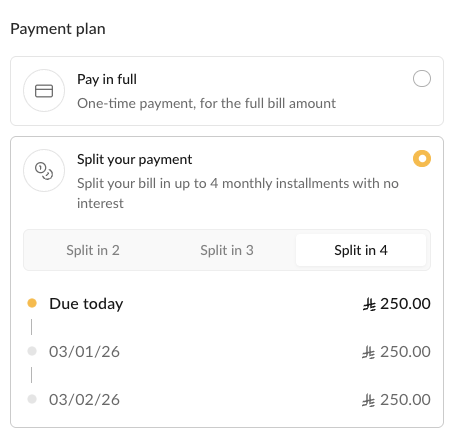
Example: 1,000 SAR split into 3 monthly installments:
- Installment 1: 333.33 SAR (due on payment date)
- Installment 2: 333.33 SAR (due 1 month later)
- Installment 3: 333.34 SAR (due 2 months later)
How Installment Amounts Are Calculated
Installment amounts are calculated by dividing the total payment by the number of installments. If the amount doesn't divide evenly, any rounding difference is added to the last installment to ensure the total always equals the original payment amount.
For example, 999.98 SAR split into 3 installments results in: 333.33 SAR, 333.33 SAR, and 333.32 SAR (the last installment is reduced by 0.01 SAR to account for the rounding difference).
Note: The total of all installments always equals the original payment amount.
Configuration
Configure installment settings in your Payment Settings. Invoice and payment link settings are configured separately.
Enable/Disable Installments
API (Payment Links)
When creating a payment link via the Payment Links API, you can enable or disable installments by including the payment_methods parameter in your request. Set installment: true to enable installments or installment: false to disable them for that specific payment link.
This setting overrides the organization's default payment link installment settings. If you don't include the payment_methods parameter, the organization's default settings will be used.
Settings Page
You can configure the default installment settings in your Payment Settings:
- For invoices: Enable or disable installments in the invoice payment options (invoices can only be created from the UI)
- For payment links: Enable or disable installments in the payment link payment options (these defaults apply when creating payment links via the UI or when the API request doesn't specify
payment_methods)
Split Options
Configure which numbers of installments (2, 3, or 4) are available for customers to choose from.
Default split options:
- 2 installments, monthly
- 3 installments, monthly
- 4 installments, monthly
The split period (the interval between installments, e.g., monthly, quarterly, yearly) cannot be changed through the API or dashboard. Contact Stream support to modify the split period.
Minimum Amount
The minimum installment amount is 100 SAR per installment. If the payment amount divided by the number of installments is less than 100 SAR, that installment option will not be available.
For example, with a payment of 250 SAR:
- 2 installments: 125 SAR each ✅ (available)
- 3 installments: 83.33 SAR each ❌ (not available, below minimum)
The minimum amount cannot be changed through the API or dashboard. Contact Stream support to modify this value.